Back to blog
8 Sep
Disable Tender Type Surcharges
With the ban on Card Surcharges coming into effect on the 1st October 2026, Tender Type Surcharges will need to be disabled on all Tender Types that are used for processing EFTPOS payments (e.g. EFTPOS, AMEX/Diners, etc).
To disable Tender Type Surcharges, complete the steps outlined below.
If using Idealpos v9 Build 13 and newer, go to: Back Office > Setup > Tender Types.
If using Idealpos v9 Build 12 and older, go to: Back Office > Setup > Function Descriptors.
Select the Tender Type > Modify.
When disabling Tender Type Surcharges for EFTPOS type payments, there may be multiple Tender Types (e.g. AMEX, Diners, Mastercard, etc.).
These steps will need to be completed for each Tender Type that is used for taking EFTPOS related payments.
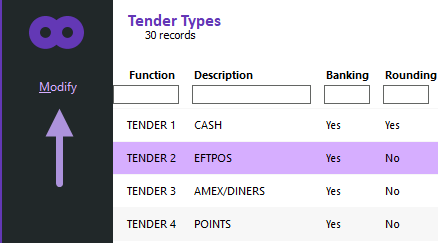
Set the Surcharge to 0.00 as shown in the example below > Press "Save" on the top-left corner.
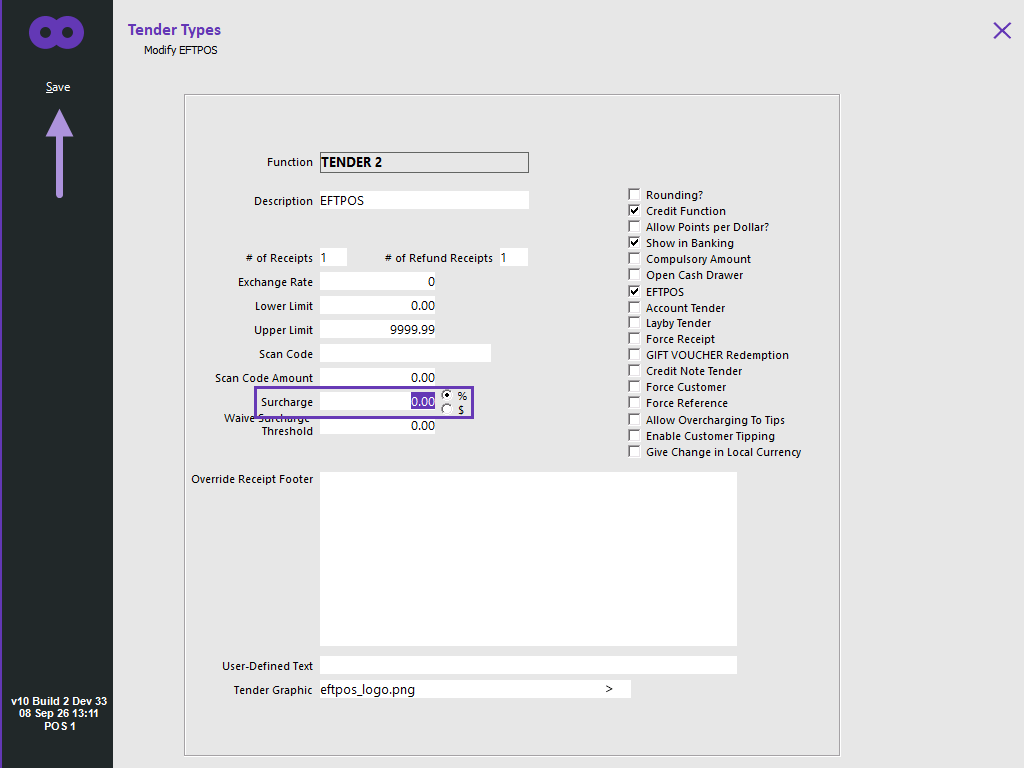
Repeat the above for each Tender Type used for taking EFTPOS payments.
In most cases, the change should apply immediately, however, a restart of Idealpos on the POS Terminals may be required to take effect.